
Workspace
Local Compute
A step-by-step walkthrough for downloading local setup files, starting the Docker adapter, syncing a local artifact, and running computations on your own machine.
On this page
How local compute works
On this page
How local compute works
On this page
How local compute works
By default, WEEMS runs your notebooks on managed machines in the cloud. Local compute is the alternative — it keeps the app, your login, and project context online, but moves the runtime onto hardware you control.
Everything you interact with — the app, login, and project context — stays online and unchanged. Only the runtime moves to your computer. Reach for it when you want execution to happen on your own hardware: to use a specific local GPU, keep data on-premises, work against local files, or avoid cloud runtime cost.
The link between WEEMS and your machine is a small Docker-based adapter you run yourself. WEEMS talks to it locally at http://127.0.0.1:8787. Once the adapter is connected and the runtime image is synced, starting a machine spins that runtime up on your computer — and your notebook executes against your resources instead of the cloud.
Before you begin
Install Docker Desktop and make sure it is running before you start. The flow uses Docker twice — once to launch the adapter, and again to confirm the runtime image — so leave the Docker window open throughout.
A stable connection matters too. The first artifact sync and the first machine start both pull image layers, and they are the slowest part of the process.
Important
If Docker is closed or still starting when you begin, later steps will stall even when your WEEMS settings are correct. Wait until Docker is fully up before continuing.
Download the setup files
Open the Machine popup and go to local setup
In the canvas, open the Machine popup and navigate to the local compute setup area.
Choose the artifact image you want to run
Select the Python runtime image that matches your project needs.
Leave the adapter URL at http://127.0.0.1:8787
This is the default local address where the adapter will listen. Leave it unchanged.
Give the adapter a name
Enter any name you will recognize later — My laptop, Office workstation, anything. It does not need to match your hostname.
Select your OS and click Download Local Setup Files
The bundle contains the start script for your platform and a local-compute-quickstart.md with these same steps for reference.
Start the adapter
Extract the downloaded Weems folder and run the start script for your platform. The script launches the adapter container and exposes it at http://127.0.0.1:8787. The first run is slower while Docker pulls supporting layers. A healthy start prints Docker Compose output and ends with a line confirming the adapter is listening.
start-local-compute.batchmod +x start-local-compute.sh
xattr -d com.apple.quarantine start-local-compute.sh 2>/dev/null || true
./start-local-compute.shchmod +x start-local-compute.sh
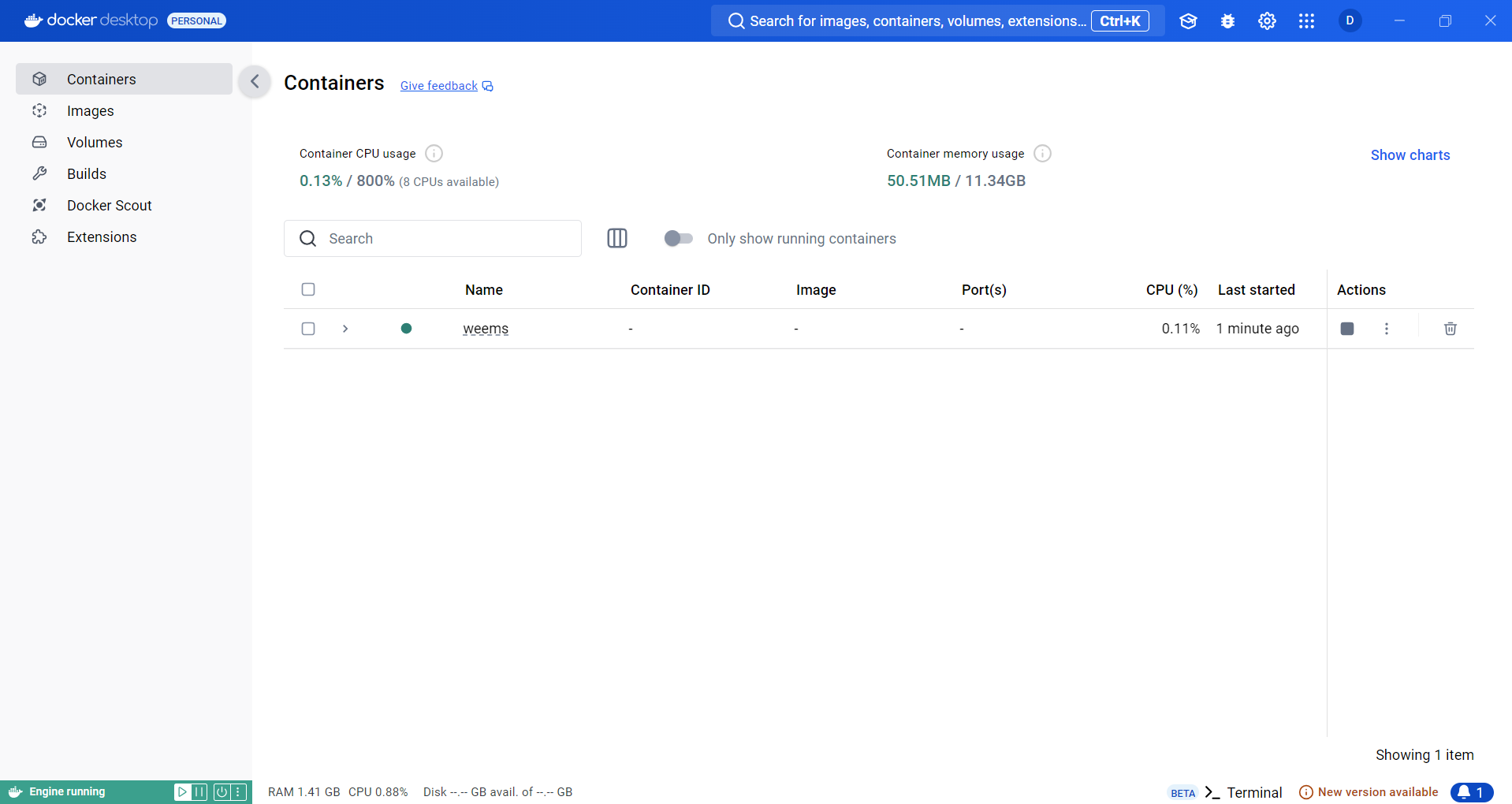
./start-local-compute.shTo confirm the adapter from Docker, open Docker Desktop → Containers and look for a container named weems-local-adapter. If it is not there, let Docker finish initializing and run the script again.
Connect and sync the runtime
Back in the Machine popup, with the adapter URL still set to http://127.0.0.1:8787, click Connect & Check. A successful handshake reports:
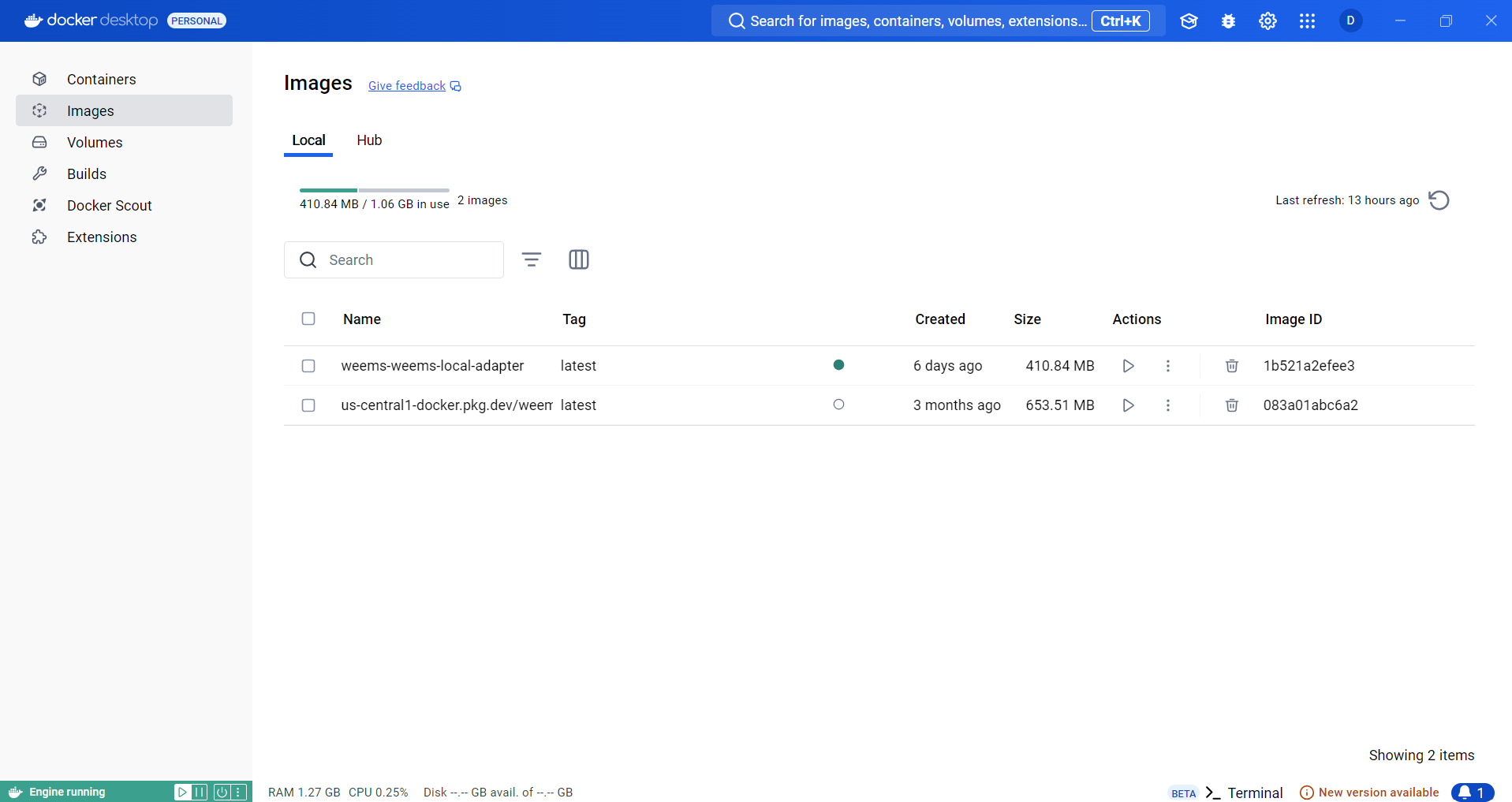
Storage stays pending until the runtime is synced. Click Sync Artifact to pull the selected Python image into Docker — this is the image your machine will run. The first sync is the slowest; leave the popup open until it finishes, since a partial pull can stop the machine from starting cleanly. When it completes, the image appears under Docker Desktop → Images.
Start the machine and run
Click Start Machine. WEEMS launches the runtime locally using the adapter and image you prepared. The first start takes a little longer while the runtime is staged — avoid retrying unless the UI shows a clear failure.
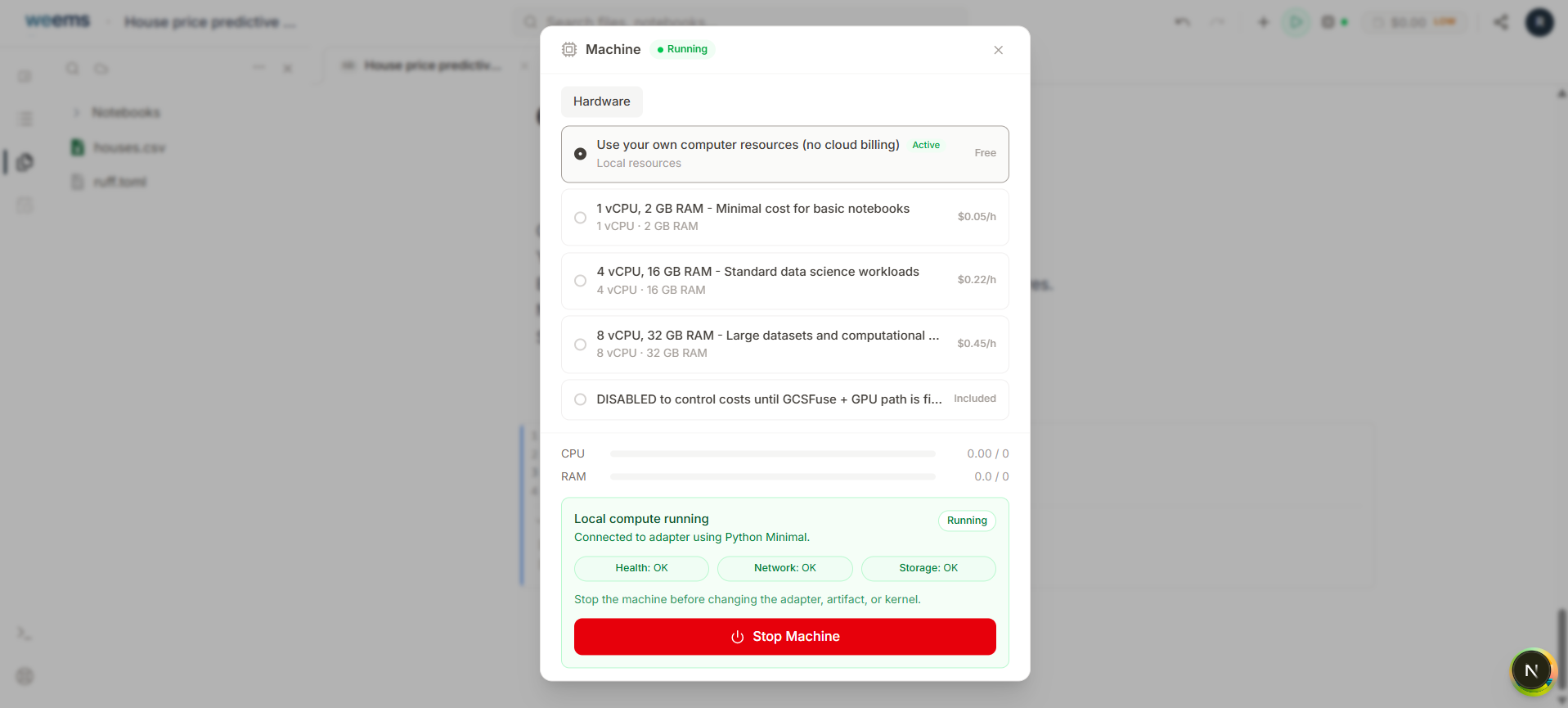
You are ready when the button switches to Stop Machine and the panel shows all four states:
Return to your notebook and run a cell. Nothing about the WEEMS experience changes, but execution now runs on your machine. Keep the Machine panel visible during the first run to confirm it stays Running.
Troubleshooting
The adapter container never appears in Docker
Docker was not fully started when you ran the script. Wait for Docker Desktop to finish initializing, then rerun the script from the extracted folder.
Connect & Check fails
Confirm the weems-local-adapter container is running in Docker Desktop and that the adapter URL is exactly http://127.0.0.1:8787.
The synced image is missing from Docker
Run Sync Artifact again and wait for the pull to finish completely before rechecking the Images tab.
The machine will not leave the starting state
Give the first start time — it is slower while the runtime is staged. If it clearly fails, stop, confirm the image is present in Docker, and start again.
Need the steps again later? Reopen local-compute-quickstart.md from the setup bundle and follow the same sequence.